Showing posts with label Distro's. Show all posts

Tuesday, 13 May 2014

Fedora 20 Desktop Edition

Fedora 20 Desktop Edition

Installable Live Media


 Download Fedora 20
     This is the latest version of the Fedora Linux operating system's Desktop Edition. It's everything you need to try out Fedora — you don't have to erase anything on your current system to try it out, and it won't put your files at risk. Take Fedora for a test drive, and if you like it, you can install Fedora directly to your hard drive straight from the Live Media desktop.


Press Download Icon to Download Fedora 20

953MB, ISO format image for Intel-compatible PCs (64-bit)


Tuesday, 4 March 2014

INSTALL AND UNINSTALL UBUNTU LIKE WINDOWS APPLICATION

INSTALL AND UNINSTALL UBUNTU LIKE WINDOWS APPLICATION :
http://www.ubuntu.com/download/desktop/install-ubuntu-with-windows

Easy Way to Install Ubuntu - from within Windows


Introduction:
A full installation of the Ubuntu Linux system into your computer requires selecting or re-formatting a partition with the ext4 or other file system. This procedure might look complicated to newbies.
For average Windows users who just want to try out Ubuntu without this complication, wouldn't it be easier to install Ubuntu Linux just like any other Windows application?
Wubi, which is Windows-based Ubuntu Installer, is a good solution. It provides the easiest way to install Ubuntu for Windows users, without the need to mess around with the existing partitions in the hard disk.
When you run Wubi in Windows, it adds an entry to the boot menu and install Ubuntu within a file in the existing Windows file system. This file is seen by Ubuntu as a loop-mounted virtual partition so that it can run from there like a real system and not just a virtual machine.
These are basically two options for running Wubi from Windows to easily install Ubuntu Linux into your computer:
 
Easy Installation -Option A: Use Ubuntu CD Image
The Ubuntu CD Image (about 706MB, ISO file) is freely available for download and can be burnt into a CD ("LiveCD") using burning software. The CD Image officially includes the installer wubi.exe.
You might want to refer to following steps for installation of Ubuntu after placing the LiveCD into a CD/DVD drive (or mounting the ISO file on a virtual drive using emulation software).
  1. In Windows, run wubi.exe from the drive to bring up an Ubuntu menu.
 
Ubuntu menu
 
Select "Install inside Windows", an Ubuntu Installer window will open up.
 
Ubuntu Installer
 
Enter password (and change the username, installation drive or other options if necessary) Click the "Install" button, Wubi will then install the image from the cd/dvd drive to the hard disk. Re-boot the computer when prompted. Select "Ubuntu" from the boot menu to complete the installation. After installation, the system reboots. Choose an option from the boot menu to run the Ubuntu system, or the Windows system.
 
Easy Installation -Option B: Download Wubi Installer
This option is to let Wubi Installer download the Ubuntu CD Image during installation. To start with, you would just need to download the installer file wubi.exe (1.4MB) from here. After download, double-click the installer file from Windows and it will show up an Ubuntu Installer window same as after Step 2 above.
The rest of the steps for installation are basically similar, except that at Step 4, the installer will download the Ubuntu CD Image from the server to the hard disk, instead of getting it from the cd/dvd drive. The download of the CD Image can take some time during the installation depending on your bandwidth.

Un-install Ubuntu from Windows
If you like to uninstall Ubuntu, open the Control Center in Windows, choose "Ubuntu" to uninstall, just like any other Windows applications.

Limitations
Wubi requires existing Windows 98, 2000, XP, Vista or 7 to install Ubuntu Linux into the existing file system. While Wubi makes installation and un-installation of Ubuntu easier from Windows, it comes with some limitations -- the hibernation is not enabled in this mode and the disk performance might be relatively reduced, but I don't see these limitations are strong enough for not trying out installation of Ubuntu from Windows.

Friday, 30 August 2013

Firefox OS – New Kid On the Block

Firefox OS – New Kid On the Block

   Ever since Android has made it big, Linux based mobile OS (refer to our article on Linux based Mobile OS ) have become the flavour of season in the technology world. Here in this article, we will peel of the first layer to know more about Linux based mobile operating system – FireFox OS.
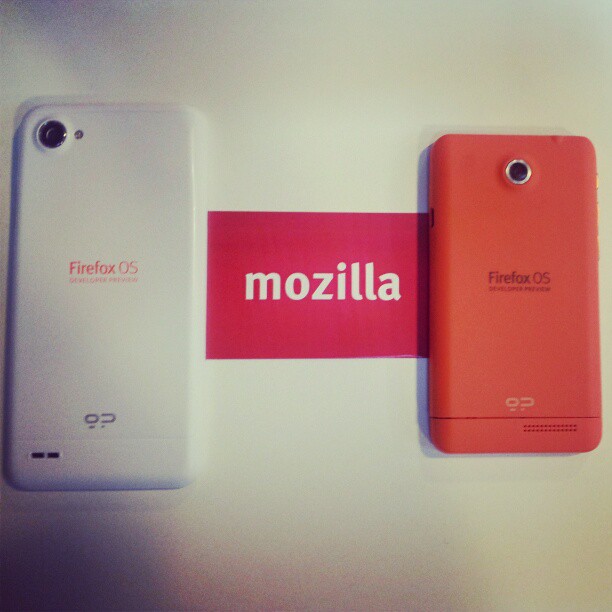
FirefoxOS
Image Courtesy – Flickr

Firefox OS is the latest open source mobile operating system based on Linux kernel and is developed by Mozilla. Mozilla amalgamates with Foxconn to barrage the new Firefox OS device in the market. Besides making devices for Apple, Foxconn is expanding its business by designing and manufacturing Firefox OS based devices for some major electronic brands. Mozilla believes that this OS will bring more diversity to the mobile market as Firefox browser brought to the web.
Apparently it will be easier to create apps for this platform as it is completely based on HTML5 which is used to build websites. This flexible Firefox OS also codenamed Boot to Gecko combines Mozilla’s Gecko technology with Linux to bring developers a powerful platform for creating distinguished products. User interface of this application is a web app which is integrally efficient in displaying and producing other web apps.
This powerful mobile operating system brings justice to multi-platform concept as it gives developer the full freedom to develop applications to their maximum efficiency and distribute them under no boundaries. In true sense, Mozilla brings open standards to the mobiles. All that a developer need is a developer preview device to start developing program for Firefox OS. One good thing about these devices is that, they are available in market at very reasonable prices e.g. Peak and Keon. As some star actors quote that they are director’s actor, we would like to quote that Firefox OS is a developer’s OS.
Want to know how to install Firefox OS on a mobile device? Refer to this youtube link
Here are some useful tips for using Firefox OS device:

1. Unlocking

For unlocking the device if Firefox OS asks for a passcode, the default code is 0000.

2. Screenshot Capturing

For capturing a screenshot, you just need to press the power and home buttons at the same time.
Then you can access the screenshot from the images.

3. USB Debugging

For enabling USB debugging, put a tick mark on Remote debugging from the settings.

4. Physical Hardware buttons

Like most of the modern smartphones, it has few number of hardware buttons which are Home button, Volume Control button and Power button which do their respective functions.


Top 3 Upcoming Linux Based Mobile OS That Can Challenge Android

Top 3 Upcoming Linux Based Mobile OS That Can Challenge Android

    Not very long ago, it was Apple’s iOS that was ruling the world of smart-phones. At that point of time, not many could think that soon another mobile OS would penetrate and eat-up a significant amount of market from Apple’s iOS. But, it did happen with Google’s Android. This Linux based mobile OS came and quickly became more popular than iOS. The amazing part of the story is that all this happened within no time.
One could easily argue that the success of Android was obvious because it was backed none other than Google but still If you try to dig in a bit more, you’ll see that a major reason of such a huge impact of Android was it being Linux-based and open-source. Being Linux-based automatically helped Android with all the positives of Linux and being open-source helped it with all the positives of community contribution. And I personally feel that the killer combination Google+Linux+OpenSource is responsible for where Android is today.
But, just as most of us could not anticipate Android sweeping the market while iOS was the world leader in smart-phones, it’s difficult today to anticipate any other mobile OS coming out of nowhere and eating out the market from Android or iOS. But, this is the world of technology and here anything can happen.

So, in this article, we’ll present top 3 upcoming Linux-based mobile OS that can change the equations in smart-phone market in near future.

1. Tizen

Tizen is a Linux-based mobile OS. it was earlier known as LiMo (Linux on mobile) but was renamed to Tizen after Meego project was stopped and Intel joined LiMo project.  As the case with most of the OS’s these days, Tizen is also an OS for multiple category of devices like mobile phones, smart TVs, tablets etc. The USP of Tizen is the ease through which network carriers can provide Value Added Services (VAS) to their subscribers.
Tizen_Pinwheel
Linux foundation oversees Tizen project while Samsung and Intel that form the technical steering group (TGS) play an active role in governing this project. Network Carriers especially in Japan have shown a good interest in Tizen while Samsung is expected to roll out new Tizen based devices soon.
Despite of a steady growth that Tizen is experiencing, the only point of concern is the app store for this OS. Application store for any smart phone OS has become an important factor that can make or break the market. We have to wait and see how Tizen performs on this aspect.
For more information :

2. Jolla Sailfish

Sailfish OS Another upcoming Linux-based OS for mobile platform. It is a product of Jolla Mobile that is currently in development stage but is being developed keeping in mind the tough competition it may face from Android. The UI is Qt based and the company claims that Sailfish OS would be a real alternative to the existing mobile OS.
sailfishOS
Sailfish OS is clearly based on the Meego project. It is said to contain the revived core of Meego. The company Jolla Mobile is planning to compete with existing leaders like Android and iOS through the Sailfish UI.  The best part of this OS is that many Android application would run on Sailfish without any change and this could prove a game-changer feature for Sailfish OS.
For more information :
UPDATE
http://www.theverge.com/2013/5/20/4347524/jolla-the-movement-sailfish-os-smartphone-price-specs-release-date

3. Ubuntu OS

Here comes the most anticipated of all the upcoming Linux-based OS for mobile platform. Touted as a game changer from canonical, Ubuntu OS brings a seamless experience for users across the devices like mobile phones, Ubuntu TVs, Ubuntu Desktops etc.
UbuntuPhone
The most talked about feature of this OS is the UI. The UI boasts of :
  • Unity – Standard User interface for all devices
  • Button less UI
  • The ‘edge magic’ feature – a swipe through the edges of the screen brings in a lot of options for the user.
  • Same code base as that of Ubuntu desktop – easy to develop application on desktop and port onto mobile.
Canonical has managed to create a buzz and excitement of this new OS in the recent CES where it demonstrated Ubuntu OS running successfully on Samsung Galaxy nexus but it is still to be seen how the market reacts to the final product which will be launched some where in 2014.
For more information :


Thursday, 11 July 2013

Oracle Linux

Oracle Linux:

The Best Linux for your Enterprise

Oracle Linux brings the latest Linux innovations to market, delivering extreme performance, advanced scalability, and reliability for enterprise applications and systems, along with worldwide, enterprise-class, low-cost support.

 Let Check For The New Version Of Oracle Enterprises Linux 6 

Sunday, 23 June 2013

Top Lightweight Linux Distros 2013

 Top Lightweight Linux Distros 2013:

 Top Lightweight Linux Distros
As computers get more and more advanced the basic system requirements for most Operating Systems (Distros) keep on rising and usually not everyone always has the cash needed to upgrade their pc but would like to use the most recent software (Distro) but can’t  . Well for all the users who’s tired of knowing their computer doesn’t meet the minimum system requirement and want to use up to date software  then you will love this list of the top lightweight linux distros so even if your computer has around 512 mb of ram or less these OS (Distros) will work superfast.
What is a lightweight Distro ? Here’s what WikiPedia says
A lightweight Linux distribution is a Linux distribution that uses relatively few resources.  For example, Lubuntu, which requires a minimum of 128 MB of RAM and a Pentium II processor, is a lightweight variant of Ubuntu, which requires a 1 GHz processor and 1 GB of RAM.

Lubuntu

Lubuntu
Lubuntu is a fast and lightweight operating system developed by a community of Free and Open Source enthusiasts. The core of the system is based on Linux and Ubuntu . Lubuntu uses the minimal desktop LXDE, and a selection of light applications. With primary focus on speed and energy-efficiency. Because of this, Lubuntu has very low hardware requirements.

Xubuntu

Xubuntu
Xubuntu is an elegant and easy-to-use operating system. Xubuntu comes with Xfce, which is a stable, light and configurable desktop environment.
Xubuntu is perfect for those who want the most out of their desktops, laptops and netbooks with a modern look and enough features for efficient, daily usage. It works well on older hardware too.

CrunchBang

CrunchBang
CrunchBang is a Debian GNU/Linux based distribution offering a great blend of speed, style and substance. Using the nimble Openbox window manager, it is highly customisable and provides a modern, full-featured GNU/Linux system without sacrificing performance.

Peppermint

Peppermint
Peppermint is a cloud-centric OS based on Lubuntu, a derivative of the Ubuntu Linux operating system that uses the LXDE desktop environment.

Puppy Linux

Puppy
Puppy Linux is a lightweight Linux distribution that focuses on ease of use. The entire system can be run from RAM, allowing the boot medium to be removed after the operating system has started. Applications such as AbiWord (a free word processing application), Gnumeric (a spreadsheet) and MPlayer (a free multimedia player) are included, along with a wide choice of web browsers that can be installed.

RHEL download

RedHat Enterprises Linux  download:

How do I download the CD or DVD images to begin my installation of Red Hat Enterprise Linux?


 TO DOWLOAD

RHEL

PRESS HERE

Install Ubuntu 13.04

Install Ubuntu 13.04:

TO DOWNLOAD UBUNTU 13.04

PRESS HERE


TO LEARN ABOUT INSTALLATION

PRESS HERE

Sunday, 24 March 2013

Distro news and release’s

Distro news and release’s

  • Linux Royal
So got the Royal Lite build done. Removed all things Unity/Gnome-shell/and classic. So it has only Cinnamon and Cinnamon 2D for DE options at bootup. Also removed a bunch of apps/icons/themes. Added Royal Icons/Cinnamon Themes. Also installed VLC/Restricted Extras/and of course Remastersys so I could build it. Wanted to make it a bit smaller but not at the cost of Libre Office so I left it. It has a minimal amount of apps though, I got it down to 971mb, so about 200mb bigger then Ubuntu and about 40% the size of full Royal builds. Even in live it only booted using 199mb of ram as noted in the screenshot here. Will try and get it uploaded tomorrow. The only thing I have left to test is installing it.
149342_412603862148542_1666923925_n
  • Crunchbang
well as we know crunchbag is more for old/light computer’s and servers and what the different on this released
they been some bug fixes in the installer on the DVD for the lastest release they had some bug the were having issues installing the Distro an error message appeared just before grub boots up properly!
And other minor changers like?
  • Iceweasel 18
  • vlc instead of gnome mplayer (popular)
  • A Policy Kit Local Authority file has been added to enable easy mounting of internal drives within Thunar
  • xfce4-power-manager has been patched to fix a long standing issue whereby the battery status icon would cause a visual error within tint2′s system tray, after a system had been suspended and resumed.
And as well the changers are kept minimum and any other crunchbag users will not need to upgrade to the next version unless they wish to help with test installations proceeding?
screenshot-default-desktop_thumb


  • Opensuse 12.3
go and get opensuse while it piping hot :)
no but opensuse is a redhat base with kde on top of it but what this make it special is the it comes with a package manager which is really good better the (gnome package manager) the fedora uses. it use something called YaST graphical user interface and Zypper as a command line interface so it both worlds plus opensuse has a rolling released distro called tumbleweed the has the latest package bit like (arch)
this beta come with the latest kde 4.10 and as well been ironing bugs and the latest kernel 3.7.1 so more support in arms computer and new support for hardware and as well
  • support for metadata checksums and improved quota support in Ext4
  • I/O failure statistics, subvolume quotas, quota groups, snapshot diffs, faster fsync and the ability to disable copy-on-write on a per-file base in btrfs
  • userspace probes for performance profiling with tools like Systemtap or perf and a new “perf trace” tool modeled after strace.
  • Many improvements to networking. The TCP protocol performance work with support for the TCP “Fast Open” mode for both clients and servers and TCP Early Retransmit (RFC 5827) as well as inclusion of the a “TCP small queues” feature and a new network queue management algorithm designed to fight bufferbloat. Other low-level protocol enhancements include support for checkpointing and restoring TCP connections and a new tunneling protocol that allows to transfer Layer 2 Ethernet packets over UDP. New is experimental SMBv2 protocol support as well as stable NFS 4.1 and parallel NFS support and the ability to have safe swapping over NFS/NBD.
  • The kernel now allows for Android-style opportunistic suspend and has support for suspending to disk and memory at the same time which prevents these “yup, ran out of battery so now you lost data” annoyances with suspend-to-ram.
  • In the security area we see added support for signed kernel modules, the Intel “supervisor mode access prevention” (SMAP) security feature, VFIO, which allows safe access from guest drivers to bare-metal host devices and a sandboxing mechanism that allows to filters syscalls.
  • Other improvements include the ability to do SCSI over Firewire and USB, support for the PCIe D3cold power state; and the usual huge number of new and improved drivers.
and plus on top of this there will be the latest version of libreoffice so don’t you worry about thing?


  • Fedora 18
fedora 18 has been released yesterday with the UEFI secure boot support so any windows 8 computer the has this feature it will work out of the box and a new installer for the the new users to install a lot easier. with advance settings from a new comer from Ubuntu (or any other Ubuntu base distro wants to try something new)?
fedora18-desktop
by default this is what it looks like very nice with the latest gnome 3.6 you are going to be right at home. with this distro and for the people who don’t know gnome. gnome is a desktop interface that use to be popular an till the gnome shell was released but don’t let it fool you this is good to add extra feature like gnome extensions to make that experience a lot better for the people the like’s gnome.
fedora18-installer
like the installer the installer called (Anaconda)
ok now for the gnome haters :) cinnamon and mate is been released into there repos by default so you can install mate or cinnamon for a change over or just install the respins it’ s really up to you?
and upgrade feature there is a program called fedup upgrade fedora 18 and as wel can upgrade offline as well so the many updates can still be made on the fly, some packages will require a system restart. The system will boot into a special update mode “in order to avoid problems related to conflicts of libraries and services that are currently running with those on disk


  • Fuduntu 2013.1
fuduntu has been updated with the lastest kernel 3.6 with driver support aka (jocky) plus they even released the netflix desktop for useful film watching since the last release they had a power manager called jupiter (mainly for eee pc’s) now that gone because jupiter power managemet development has stopped sorry everyone
if people dont know what fuduntu is well it’s an easy use system (as always) the a rolling released system they use to be base on fedora but now independent it use the gnome2 interface which that good for people who love the gnome 2 interface (sorry mate)
fuduntu